Scheduling and booking
Let People Book
Time With You
Set your hours once, make a booking page for each kind of meeting, and share one link. Guests pick an open time in their own timezone and get a confirmation with a calendar file.
Start on the Free plan with your own booking link. No card needed.

How it works
From Sign In
To First Booking
- 01
Make A Booking Page
Name it, set the length and where you meet, and pick an accent color.
- 02
Set Your Hours
Choose the days and times you take meetings, in your own timezone.
- 03
Share Your Link
Add it to your email signature, website or messages.
For your guests
Guests Pick A Time
In Their Own Timezone
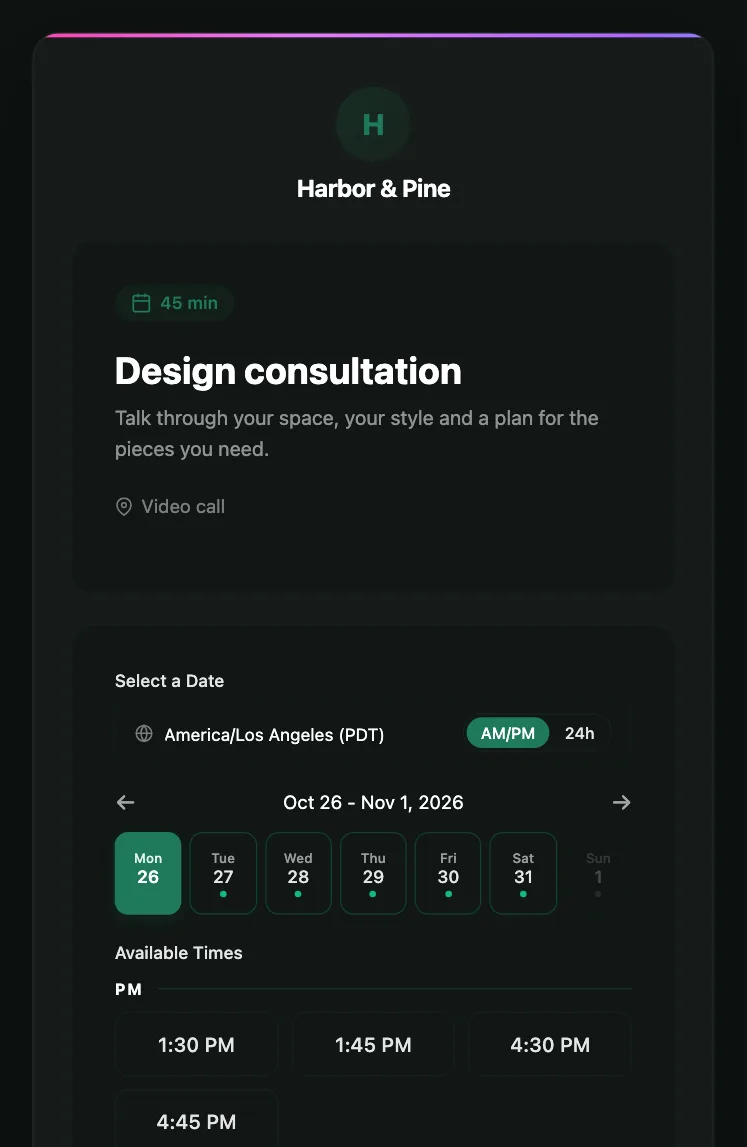
Your booking page shows only the times you are free, in the timezone of whoever opens it.
- Open times show in each guest's timezone, so nobody works out the difference.
- Guests switch between a 12 and 24 hour clock.
- A time closes the moment someone books it.
- No time that suits? Guests can ask for one that does.
Your hours
Set Your Week Once
And Keep It Yours
Tell Lesuto Connect when you take meetings. It keeps every booking page inside those hours.
- More than one time range a day, so lunch stays free.
- Add days off and holidays, and those days close.
- Your hours stay in your timezone, wherever your guests are.
- Buffers, notice and a daily cap on each booking page keep your day in shape.

Your side
Every Booking
In One Place
You always know what is coming up, and nothing changes without you hearing about it.
- An email with a calendar file for every new booking, cancellation and reschedule.
- Upcoming, past and cancelled bookings in one list in the app.
- Cancel with a reason when plans change, and the guest is emailed.
Analytics
See What Gets
Booked And Why
Booking analytics come with paid plans.
- Bookings and cancellations over the last 30 or 90 days.
- Which booking pages fill up, and who hosts the most meetings.
- Where guests came from: a shared link, a QR code or your website.
- Your busiest day of the week at a glance.

And more
Everything A Booking
Needs Along The Way
From the first email to the day of the meeting, the details are handled.
A Page For Every Meeting
Calls, consultations or visits, each with its own length, place and color.
Learn more
Google Calendar And Meet
Busy times stay closed, and bookings land on your calendar with a Meet link.
Confirmations And Reminders
A confirmation with a calendar file, then reminders a day and an hour before.
Learn more
Guests Reschedule Themselves
Guests reschedule or cancel in one click, without writing to you.
Learn more
Round Robin And Team Meetings
Share bookings out evenly, or offer times when everyone is free.
Learn more
On Your Website, On Paper
Put a booking page on your website, or print its QR code.
Learn more
Pricing
Start Free
Grow When You Need To
Every plan includes your own booking link and booking pages. Change plans any time.
Free
$0per month
3Booking pages
Pro
Recommended$11.99per person a month
20Booking pages
Team
$15.99per person a month
50Booking pages
Questions
Common Questions
How do guests in other timezones book?
Guests see your open times in their own timezone. You set your hours in yours, and Lesuto Connect lines the two up.
Does it work with my calendar?
Yes, with Google Calendar. Connect it in Settings: busy times close on your booking pages, and every booking is added to your calendar. Each person on a team connects their own.
Can two people book the same time?
No. A time closes the moment it is booked, so two guests never end up in the same spot.
How do guests change a booking?
Every email to a guest has a link that opens their booking. From there they can reschedule, cancel, or add and remove other attendees. Their confirmation code works on your booking page too.
How do I hear about new bookings?
The workspace owner and admins get an email for every new booking, cancellation and reschedule, with a calendar file attached.
Where do meetings happen?
Wherever you say. Each booking page has a location you type in, such as a phone number or an address, or a Google Meet link made for every booking when your Google Calendar is connected.
Is there a free plan?
Yes. Start on the Free plan with your own booking link, and move up when you need more booking pages or bookings. The pricing page shows what each plan includes.
Share Your Link
And Let Them Book
Make your first booking page in a few minutes and send the link today.